- →A crawler simulator tells you what is reachable. Only logs tell you what Google chose to fetch, and the gap between the two is where crawl waste lives.
- →Google's crawl budget documentation, refreshed in December 2025, frames the problem as crawl-rate limit plus crawl demand. Logs are the only place you can measure demand rather than guess it.
- →Aggregating all bot hits into one line is the classic 2026 error: Googlebot, GPTBot and retrieval crawlers behave differently and need separate classification before any conclusion holds.
- →Verify Googlebot by reverse DNS before counting a single request. Unverified user-agent strings inflate crawl numbers and turn an audit into fiction.
- →A CDN or full-page cache absorbs requests before they reach origin, so origin-only logs systematically undercount crawling. Pull edge logs or accept that your denominator is wrong.
- →Crawled is no longer a proxy for performing: Ahrefs' 300,000-keyword study published 28 May 2026 found position-one CTR on AI Overview keywords fell from 0.073 to 0.016 between December 2023 and December 2025.
What a log line actually contains
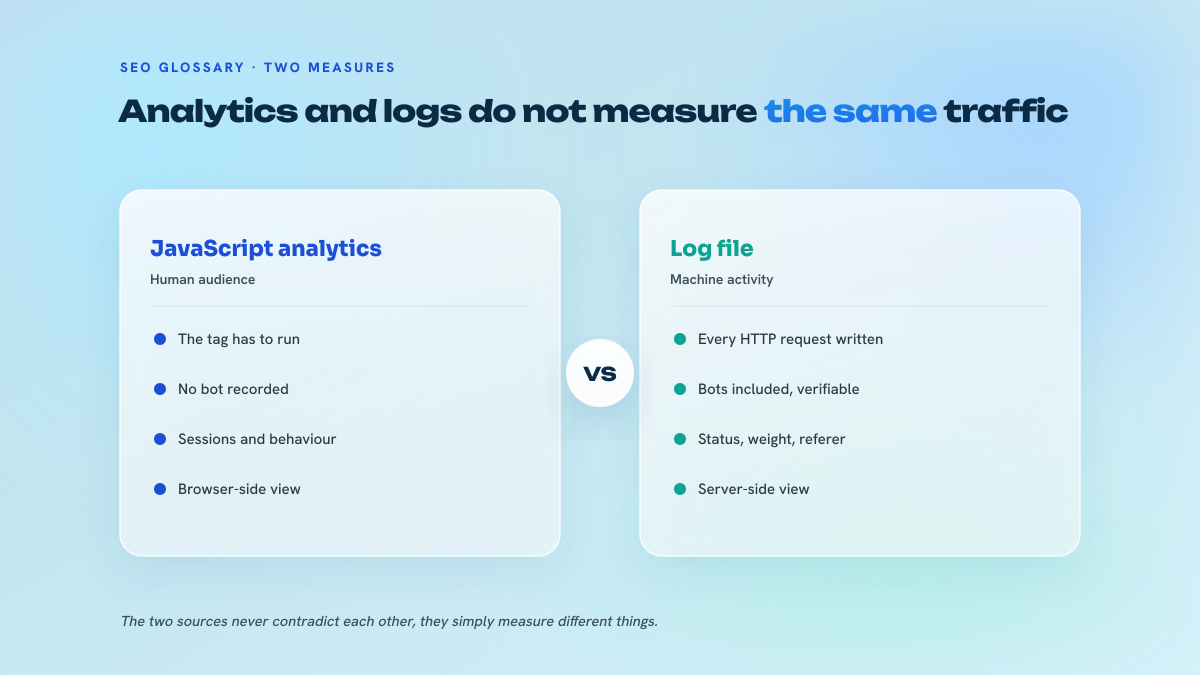
A server log line is a receipt. The web server writes one every time something asks for a resource, and unlike analytics it does not care whether JavaScript ran, whether a cookie was accepted or whether a human was involved. That indifference is exactly why it matters: bots do not execute your analytics tag, so a crawler is invisible to GA4 and fully visible in the log.
Which fields you get depends on the format, and this is the part most guides skip. The Common Log Format gives you the client IP, the identity and user fields (almost always a dash), the timestamp, the request line, the status code and the response size. That is it, and it is not enough: no user-agent, so you cannot separate Googlebot from a scraper. The Combined variant adds referer and user-agent, which is the practical minimum for SEO work. W3C Extended, used by IIS and by most CDNs, is field-declarative: a header line names the columns, and you can add time-taken, the cache status, the host and the query string as separate fields. IIS logs are W3C Extended by default but administrators frequently strip the user-agent field to save disk, which quietly makes them useless for this work.
The first hour of any log project is spent on plumbing, not insight: confirming the format, confirming the retention window, confirming that the user-agent and status code fields were not truncated, and confirming whether the timestamps are UTC or local. Get that wrong and every conclusion downstream inherits the error.
How to run the analysis without buying anything
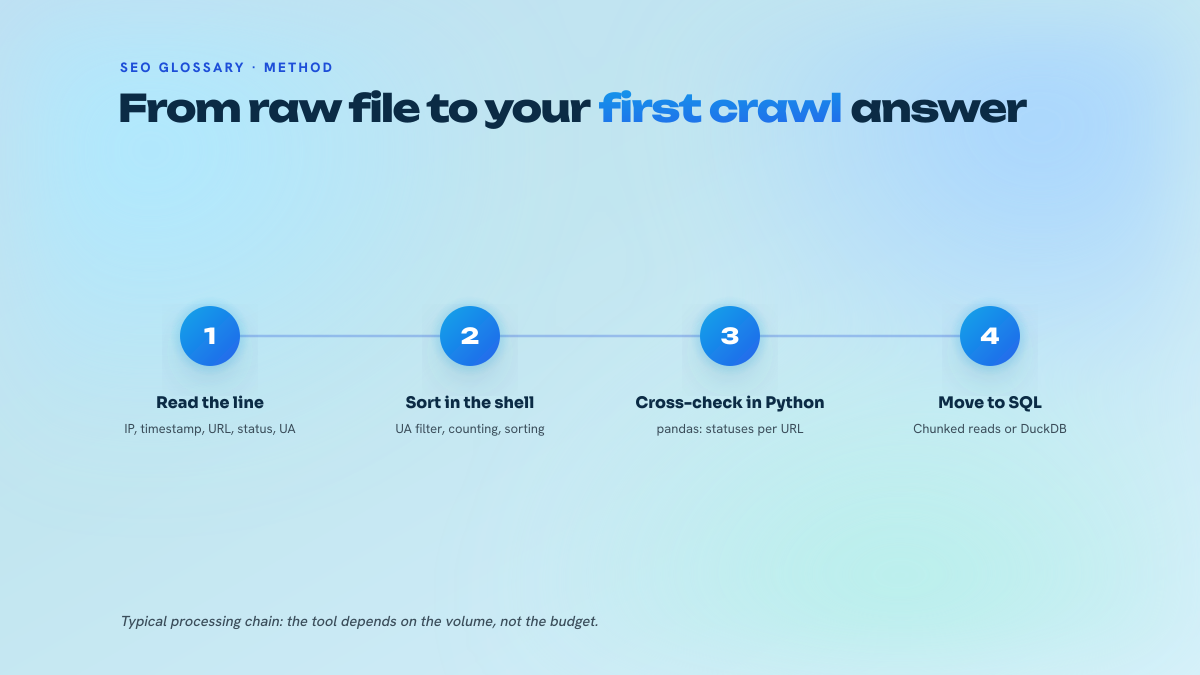
The workflow is unglamorous. Pull a window of logs long enough to be representative, thirty days is the working default and seven is the absolute floor for a small site. Filter to bot requests. Verify the ones claiming to be Googlebot. Then aggregate by directory, by template and by status code, and compare that distribution against the URLs you actually care about.
Verification is not optional and is the step amateurs skip. Anyone can send a request with Googlebot in the user-agent string, and plenty of scrapers do precisely that to bypass rate limits. Google's documented method is a reverse DNS lookup on the requesting IP, which must resolve to googlebot.com or google.com, followed by a forward lookup that must return the original IP. Google also publishes its crawler IP ranges as JSON, which is faster to match against at volume. Skip this and you will report a crawl surge that was a scraping campaign.
This walkthrough covers the same ground visually if you prefer to see the pipeline end to end before building your own:
You do not need a paid analyser to do this. A gzipped month of logs, zcat piped through grep for the bot signature, cut to keep the URL and status columns, then sort and uniq for the counts, will answer the majority of questions on a site under a hundred thousand URLs. Load the result into a spreadsheet and pivot on directory. The paid tools save time and draw nicer charts, they do not see anything the raw file hides.
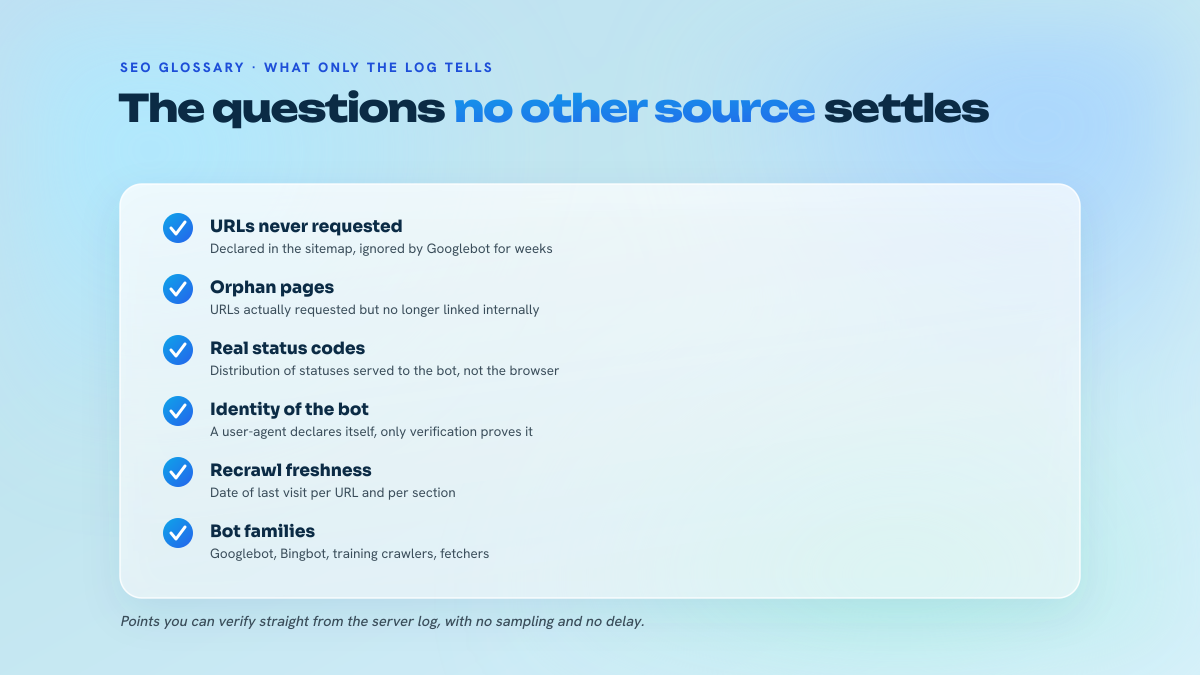
The single highest-value join is logs against your own crawl: run a full site crawl with a desktop spider, then set-difference the two lists. URLs in the crawl but absent from the log are pages Google has not bothered with. URLs in the log but absent from the crawl are orphans, and orphans that Google keeps fetching are usually old URLs still linked from somewhere external, which is often a redirect or a lost backlink waiting to be reclaimed.
Crawl budget: the evidence layer nothing else gives you
Google refreshed its large-site crawl budget documentation in December 2025, and the framing is worth quoting in structure if not in words: budget is the intersection of a crawl-rate limit, meaning what your server can absorb without degrading, and crawl demand, meaning what Google wants to fetch based on popularity, freshness and perceived value. The rate limit is an infrastructure question. Demand is an SEO question, and logs are the only instrument that measures it.
Google is also explicit about scale: crawl budget management is relevant above roughly one million unique pages updated weekly, or ten thousand pages updated daily. Below that, if your pages are not getting crawled, the problem is almost never budget, it is value, internal linking or duplication. I would still run logs on a fifty thousand URL site, not to optimise a budget but to find the 404s, the redirect chains and the parameter explosions that no simulator surfaces at the right frequency.
The same documentation contains a warning that gets ignored constantly: blocking URLs in robots.txt does not reallocate the freed capacity to other URLs unless server capacity was the actual constraint. Disallowing your faceted navigation because a blog post said it saves crawl budget is cargo cult. What logs let you do instead is measure crawl share by directory and template, count Googlebot requests returning 3xx, 4xx and 5xx, spot sitemap URLs that have never once been requested, and see how response time degrades during crawl peaks. Those are decisions grounded in evidence rather than folklore. Industry write-ups often cite thirty to fifty percent of crawl allocation going to non-essential URLs on large sites, and while that is an estimate rather than a Google benchmark, the shape is right: on most large sites I have audited, the tail is bigger than anyone expected.
This one focuses on turning log findings into concrete technical fixes:
There is a netlinking consequence people miss. Link equity that lands on a page Googlebot fetches once a quarter compounds far more slowly than equity landing on a page it fetches daily. Before picking the destination pages for a campaign in the media catalogue, check their crawl frequency in the log. Pointing links at a URL sitting in the cold tail is not wrong, but it means paying for a delay you could have avoided by fixing internal linking first. The mechanics of that trade-off are the substance of how Google rations its fetching across a large site.
The file stopped being about Googlebot alone
Filtering for Googlebot and calling it a day was defensible in 2022. It is not now. Cloudflare's 2025 Radar Year in Review, published 16 December 2025, reported that non-Google AI bots generated 4.2 percent of HTML requests across its network while Googlebot generated around 4.5 percent, with Googlebot still accounting for more than 28 percent of verified-bot traffic. The AI share was volatile inside that year, moving from 2.4 percent in early April 2025 to 6.4 percent in late June 2025.
Practically, that means your bot classification needs at least three buckets rather than one. Search crawlers, Googlebot and Bingbot, drive indexation. Training crawlers such as OpenAI's corpus-collection agent and ClaudeBot consume content for model training and produce no referral traffic by design. Retrieval and user-action crawlers, PerplexityBot and ChatGPT-User among them, fetch a page because a user asked a question right now, and those hits do correlate with citations. Aggregating the three hides the only thing you wanted to know: whether a server slowdown is throttling your indexation or simply reflecting AI retrieval load.
The other half of the shift is that being crawled has weakened as a proxy for being useful. Ahrefs published an updated study on 28 May 2026 covering 300,000 keywords from aggregated Search Console data: position-one CTR on informational results fell from 0.076 in December 2023 to 0.039 in December 2025, and on keywords showing AI Overviews it fell from 0.073 to 0.016, which Ahrefs framed as a 58 percent reduction associated with AI Overviews. Since 3 June 2026, Google has exposed dedicated Search Console reports for AI Overviews and AI Mode impressions, which finally lets you join three layers: what gets crawled, what gets impressions, and what gets surfaced in generative features. A page heavily fetched by third-party AI bots and generating nothing measurable is a legitimate finding, not noise.
Tools, what they cost, what they hide
Screaming Frog's Log File Analyser is a separate product from the SEO Spider and is priced around 99 pounds per year, with a free tier capped at 1,000 log events. That cap is low enough that the free version is a demo rather than a working tool, but the paid licence is the cheapest serious option on the market and handles Googlebot verification natively. Semrush ships a log analyser inside its subscription, which is convenient if you already pay for the suite and limited on file size. Botify and the enterprise platforms stream logs continuously and are worth their cost only above a certain scale, where the value is the daily time series rather than the one-off audit.
This short demo shows the Semrush analyser working through a real file:
What every tool hides is the sampling and the classification logic. If the tool decides what counts as Googlebot without reverse DNS, its numbers are inflated. If it truncates a large upload, its distribution is skewed. Ask the tool what it dropped before trusting the chart.
Where log analysis goes wrong
The most expensive mistake is the denominator. A CDN or a full-page cache serves the response at the edge and the origin never records the request, so origin logs undercount crawling by whatever your cache hit ratio happens to be. On a well-cached site that can be most of the traffic. Either pull edge logs from the CDN, which usually means enabling a log delivery job that nobody has switched on, or state the limitation explicitly in the report.
Second, privacy. Logs contain IP addresses, which are personal data under the GDPR, and a great many organisations run indefinite retention with no documented purpose. Before you request twelve months of raw logs, check what retention policy applies and whether the analysis needs to happen inside the perimeter. The pragmatic answer is usually to truncate or hash the IP after the Googlebot verification step, which preserves everything the SEO work needs and removes the identifier.
Third, drowning. A month of logs on a busy site is tens of millions of lines and there is no shortage of things to plot. Pick the question before opening the file: is important content being fetched, is the crawler wasting itself on parameters and internal search, are error codes trending up, is anything being fetched that should not exist. Everything else is decoration.
Fourth, treating a single snapshot as a diagnosis. Crawl activity is seasonal, responds to core updates, and reacts to your own publishing rhythm. The December 2025 core update ran from 11 December to 29 December 2025, roughly eighteen days, and any log window overlapping it needs that context before you attribute a crawl shift to your own changes.
Last, the operational point that ties this to link acquisition. Across the French editorial media we run in-house, crawl frequency is a hosting metric we watch precisely because it sets how fast a placed link registers, which is also why our published rates sit next to the traffic and authority data for each site rather than behind a quote form. A link on a page Google fetches weekly is a different product from a link on a page it fetches twice a year, and the log is the only document that tells you which one you bought.
Nautilinks operates an owned network of editorial media. In-house written articles, transparency disclosures respected, anchor mix calibrated.
Frequently asked questions
Is there a genuinely free way to analyse logs, or is the free tier just a demo?
Free tiers are demos: Screaming Frog's Log File Analyser caps its free version at 1,000 log events, which will not cover a day on most sites. The real free path is the command line. zcat your gzipped logs, grep the bot signature, cut the URL and status columns, then sort and uniq for counts, and pivot the result in a spreadsheet. GoAccess also parses standard formats into a readable dashboard at no cost. Neither verifies Googlebot for you, so add the reverse DNS check yourself.
How much log history do I actually need before the analysis means anything?
Thirty days is the working default because it covers a full publishing cycle and smooths weekday effects. Seven days is the floor and only tells you about very frequent crawling. For crawl budget work on a large site you want ninety days, so you can see whether a directory's crawl share is trending rather than fluctuating. Check the retention policy first: many servers rotate at fourteen days, and nobody will recover what has already been deleted.
Does log analysis still matter for a site well under Google's crawl budget thresholds?
Yes, but not for budget. Google's own guidance puts meaningful crawl budget management above roughly a million pages updated weekly or ten thousand daily. Below that, logs still surface things nothing else does: 404s Googlebot keeps requesting, redirect chains being followed repeatedly, orphan URLs receiving crawl activity, and pages in your sitemap that have never once been fetched. That last finding is usually an internal linking problem, and it is invisible in Search Console.
How do I separate AI crawlers from search crawlers, and does the distinction change any decision?
Classify on verified identity, not user-agent string alone: search crawlers such as Googlebot and Bingbot, training crawlers such as GPTBot and ClaudeBot, and retrieval crawlers such as PerplexityBot and ChatGPT-User. It changes two decisions. If server load is degrading your crawl rate, you need to know which bucket is causing it before throttling anything. And retrieval crawler hits on a URL correlate with that page being used to answer a live question, which is a signal worth tracking against the AI visibility reports Google opened in Search Console on 3 June 2026.
Our logs sit behind Cloudflare. What am I missing if I only read origin logs?
Everything the edge served from cache. A cached hit never reaches origin, so your Googlebot request count is understated by roughly your cache hit ratio, and the understatement is not uniform: static and popular URLs are cached hardest, which are often the ones you most want to measure. Enable log delivery from the CDN and analyse edge logs, or join both. If neither is possible, report the origin numbers as a lower bound and say so, rather than presenting them as complete.
Can I keep raw logs for a year for SEO purposes under the GDPR?
IP addresses are personal data, so indefinite retention with no documented purpose is a problem regardless of what the SEO team wants. The workable pattern is to run the Googlebot verification, which needs the raw IP, then truncate or hash it and keep the derived dataset: timestamp, URL, status, bytes, response time, verified bot class. That preserves every analysis described here and drops the identifier. Agree the retention window with whoever owns the data protection register before requesting the export.
Test your knowledge
Quiz: Log file analysis
1/3Why is Common Log Format usually inadequate for SEO log analysis?